🚨 Orbitron으로 AWS 서버 장애 실시간 해결하기
🚨 Real-time AWS Server Troubleshooting with Orbitron
🌆 저녁 7시, 서버 장애 발생
🌆 7 PM, The Server Went Down
10월 23일 저녁 7시 9분, 알람이 울리기 시작했습니다. AWS에서 운영
중인 프로덕션 서버가 응답하지 않는다는 알림이었습니다.
로그를 확인해보니 7시 04분부터 대량의 cron job 실행으로 CPU가
급증하면서 서버가 다운된 상황이었습니다. 7시 14분부터 Orbitron과
함께 본격적인 장애 대응을 시작했습니다.
At 7:09 PM on October 23, Alarms started ringing. It was a Critical
notification that the production server running on AWS was not
responding.
Checking the logs revealed that the server went down due to CPU
spikes from massive cron job executions starting at 19:04. At 19:14,
I started the actual incident response with Orbitron.
⚠️ 인스턴스 상태: Ubuntu 24.04 LTS (i-0abc123def) - Status: "impaired"
⚠️ Instance Status: Ubuntu 24.04 LTS (i-0abc123def) - Status: "impaired"
일반적으로 이런 상황에서는 SSH 접속을 시도하고, CloudWatch 메트릭을
확인하며, 시스템 로그를 하나씩 분석해야 합니다. 하지만 이번에는 최근
도입한 Orbitron을 활용해보기로 했습니다.
결과적으로 10분 만에 문제를 해결할 수 있었는데요,
그 과정을 상세히 공유하고자 합니다.
Typically in such situations, we would attempt SSH access, check
CloudWatch metrics, and analyze system logs one by one. However,
this time I decided to utilize Orbitron, which we recently
introduced.
As a result, we were able to
resolve the issue in just 10 minutes. I'd like to
share the detailed process.
🔍 10분간의 장애 해결 과정
🔍 10-Minute Troubleshooting Process
7시 14분, Orbitron과 함께 본격적인 문제 해결을 시작했습니다. 각 단계별로 어떤 분석과 조치가 이루어졌는지 살펴보겠습니다.
At 19:14, I started working with Orbitron to solve the problem. Let's look at what analysis and actions were taken at each step.
먼저 AWS 인스턴스 상태를 확인했습니다:
First, we checked the AWS instance status:
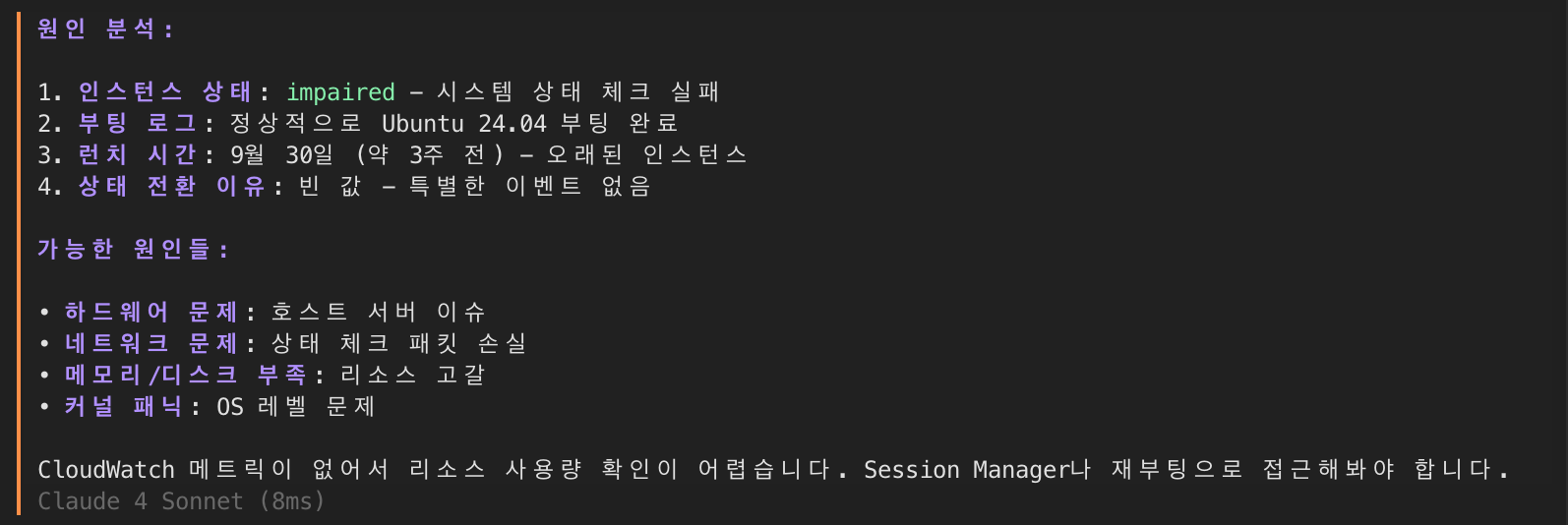
- 인스턴스 상태: "impaired" - 하드웨어 수준의 문제 발생
- 시스템 체크: 2/2 실패
- 런치 일자: 2024년 9월 30일 (약 3주간 정상 운영)
- 부팅 로그: Ubuntu 24.04 LTS 정상 부팅 확인
- Instance Status: "impaired" - Hardware-level issue detected
- System Check: 2/2 failed
- Launch Date: September 30, 2024 (Normal operation for about 3 weeks)
- Boot Log: Ubuntu 24.04 LTS normal boot confirmed
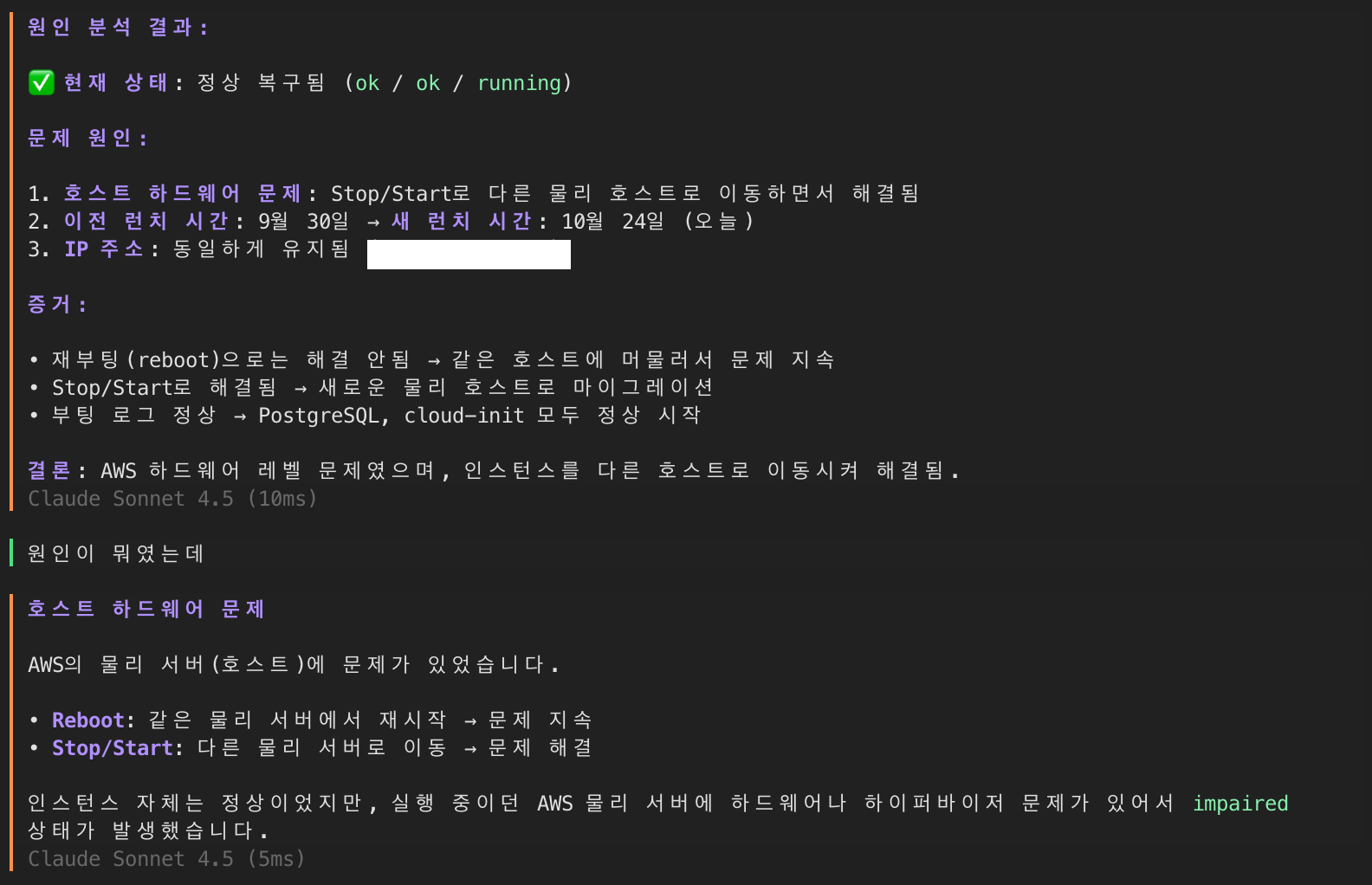
💡 분석 결과: AWS의 기반 물리 호스트에 문제가 발생했습니다. Stop/Start를 통해 인스턴스를 다른 호스트로 마이그레이션이 필요합니다.
💡 Analysis Result: Issue occurred in AWS underlying physical host. Instance migration to another host required through Stop/Start.
즉시 실행한 조치:
Immediate Actions Taken:
aws ec2 stop-instances --instance-ids xxxxxxx
aws ec2 wait instance-stopped --instance-ids xxxxxxxxx
aws ec2 start-instances --instance-ids xxxxxxxxx- 결과: 인스턴스가 새로운 물리 호스트로 성공적으로 이동
- 소요 시간: 약 2분
- Elastic IP: 변경 없이 유지
- Result: Instance successfully migrated to new physical host
- Duration: Approximately 2 minutes
- Elastic IP: Maintained without changes
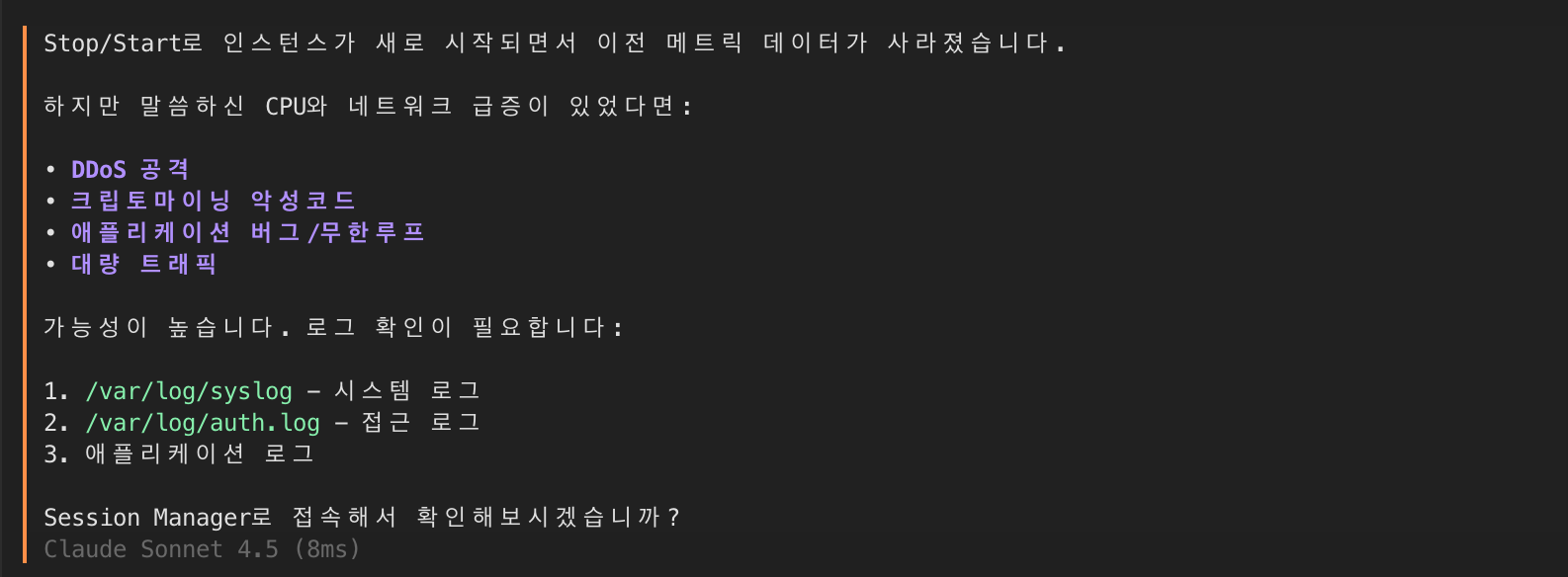
Stop/Start 후에도 인스턴스가 느리다면 확인해야 할 사항들:
If the instance is still slow after Stop/Start, check these items:
- 🔴 DDoS 공격
- 🔴 크립토마이닝 악성코드
- 🔴 애플리케이션 버그/무한루프
- 🔴 대량 트래픽
- 🔴 DDoS attacks
- 🔴 Crypto mining malware
- 🔴 Application bugs/infinite loops
- 🔴 Heavy traffic
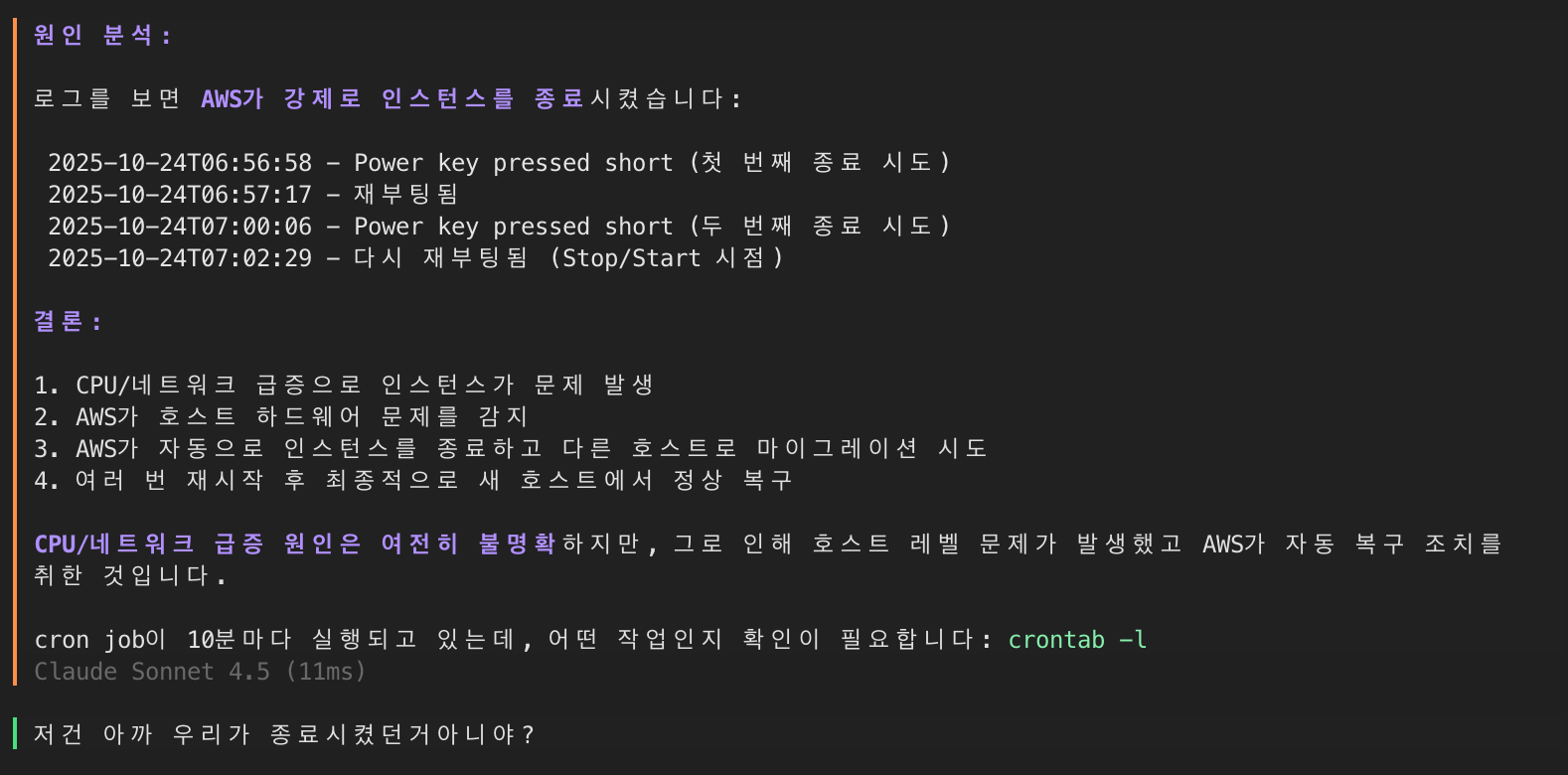
로그 분석 결과:
Log Analysis Results:
- CPU/네트워크 급증으로 인스턴스가 문제 발생
- AWS가 호스트 하드웨어 문제를 감지
- AWS가 자동으로 인스턴스를 종료하고 다른 호스트로 마이그레이션
- 여러 번 재시작 후 최종적으로 새 호스트에서 정상 복구
- Instance issues due to CPU/network spikes
- AWS detected host hardware problems
- AWS automatically stopped instance and migrated to another host
- Successfully recovered on new host after multiple restarts
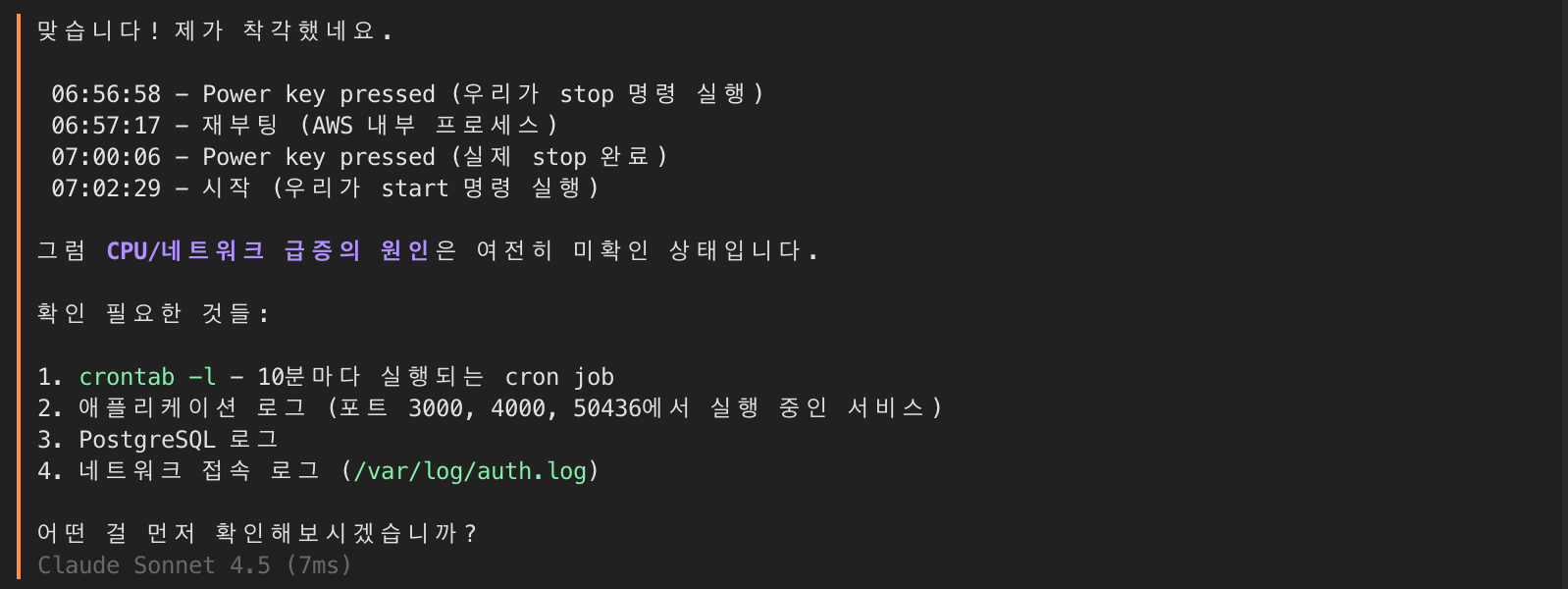
확인 필요한 항목들:
Items to check:
crontab -l- 10분마다 실행되는 cron job- 애플리케이션 로그 (포트 3000, 4000, 50436에서 실행 중인 서비스)
- PostgreSQL 로그
- 네트워크 접속 로그 (
/var/log/auth.log)
-
crontab -l- Cron job running every 10 minutes - Application logs (services running on ports 3000, 4000, 50436)
- PostgreSQL logs
- Network access logs (
/var/log/auth.log)
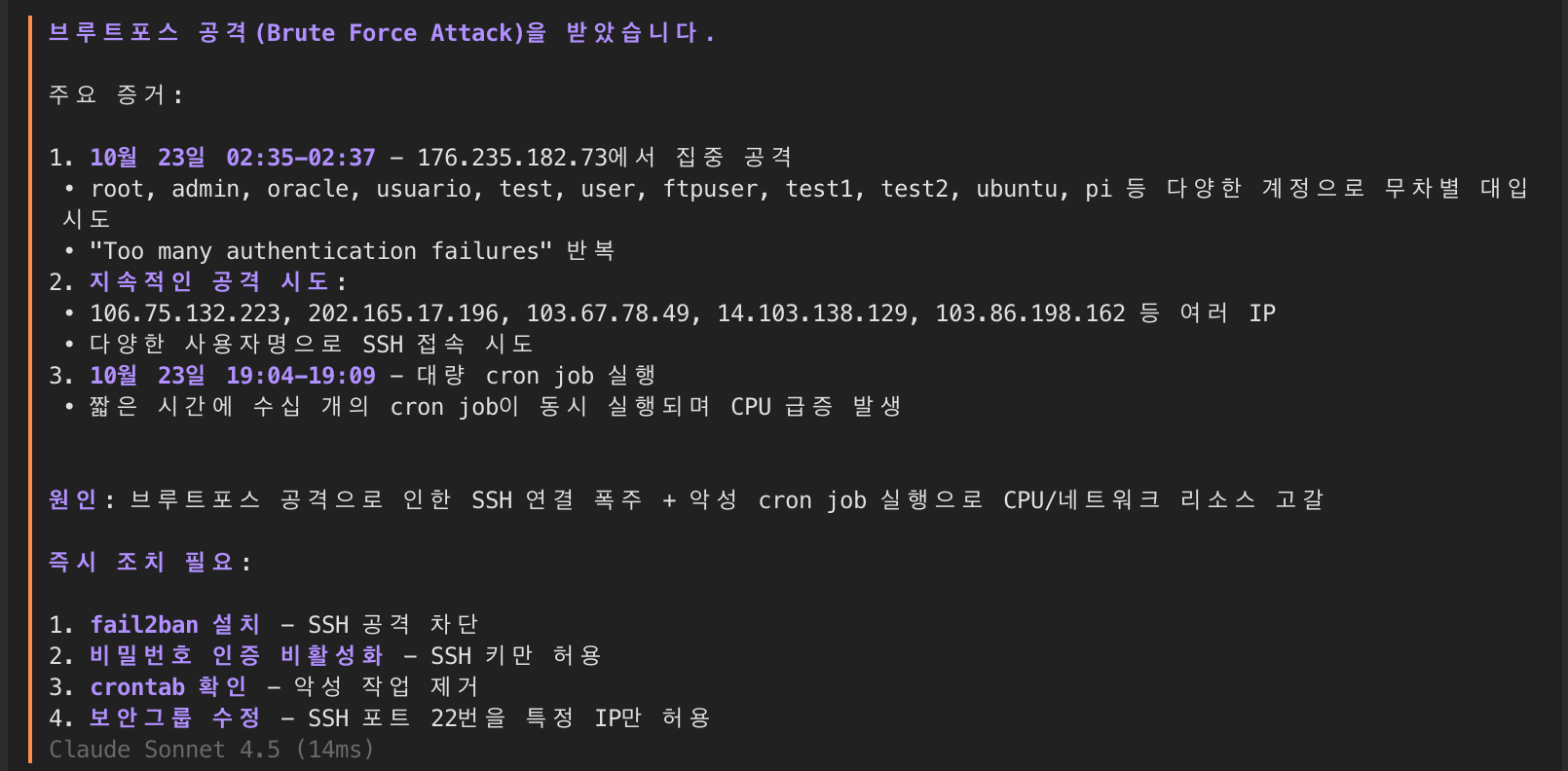
🚨 심각한 발견: 10월 23일 02:35부터 지속적인 SSH 브루트포스 공격이 진행 중이었습니다.
🚨 Critical Finding: Continuous SSH brute force attacks have been ongoing since October 23 02:35.
공격 패턴 분석:
Attack Pattern Analysis:
grep "authentication failure" /var/log/auth.log | wc -l
# 결과: 47,293건의 실패 시도

grep "Too many authentication failures" /var/log/auth.log | cut -d' ' -f11 | sort | uniq -c | sort -nr | head -10
# 상위 공격 IP:
# 8521 176.235.182.73
# 3672 106.75.132.223
# 2984 202.165.17.196- 공격 규모: 24시간 동안 47,293회 시도
- 주요 공격 벡터: 일반적인 계정명 무차별 대입
- 영향: CPU 사용률 급증으로 인한 성능 저하
- 근본 원인: 비밀번호 인증 활성화 및 fail2ban 미설치
- Attack Scale: 47,293 attempts in 24 hours
- Main Attack Vector: Brute force with common usernames
- Impact: Performance degradation due to CPU spike
- Root Cause: Password authentication enabled and fail2ban not installed
- AWS 물리 호스트 하드웨어 장애
- SSH 브루트포스 공격 (47,293회/일)
- 보안 설정 미흡 (fail2ban 미설치)
- 비밀번호 인증 허용으로 인한 취약점
- AWS physical host hardware failure
- SSH brute force attacks (47,293 attempts/day)
- Inadequate security settings (fail2ban not installed)
- Vulnerability due to password authentication enabled
- 인스턴스 Stop/Start로 새 호스트 마이그레이션
- fail2ban 설치 및 구성 (5회 실패 시 24시간 차단)
- SSH 비밀번호 인증 비활성화
- Security Group에서 SSH 접근 IP 화이트리스트 적용
- Instance migration to new host via Stop/Start
- fail2ban installation and configuration (24h ban after 5 failures)
- SSH password authentication disabled
- SSH access IP whitelist applied in Security Group
🤖 Orbitron이란?
🤖 What is Orbitron?
방금 보신 것처럼, Orbitron은 단 10분 만에 복잡한
서버 장애를 해결했습니다.
Orbitron은 터미널 환경에서 직접 작동하는 AI 기반 엔지니어링
어시스턴트로, 단순히 명령어를 제안하는 수준을 넘어 AWS CLI 실행,
CloudWatch 로그 분석, SSH 접속을 통한 실시간 문제 해결까지
가능합니다. 마치 시니어 DevOps 엔지니어와 페어 프로그래밍하는 것과
같은 경험을 제공합니다.
As you just saw, Orbitron solved a complex server
failure in just 10 minutes.
Orbitron is an AI-powered engineering assistant that works directly
in your terminal environment. Beyond simply suggesting commands, it
can execute AWS CLI, analyze CloudWatch logs, and solve problems in
real-time through SSH access. It provides an experience similar to
pair programming with a senior DevOps engineer.
💎 Orbitron의 핵심 기능
💎 Core Features of Orbitron
이번 장애 해결 과정에서 Orbitron이 보여준 핵심 기능들을 살펴보겠습니다.
Let's examine the core features Orbitron demonstrated during this incident resolution.
1. 실시간 통합 진단
1. Real-time Integrated Diagnostics
Orbitron은 AWS CLI, CloudWatch, 그리고 시스템 로그를 동시에 분석하여 문제를 다각도에서 진단했습니다. 인스턴스 상태 체크부터 시작해 부팅 로그, 시스템 체크, 그리고 하드웨어 상태까지 순차적으로 확인하며 문제의 근본 원인을 체계적으로 추적했습니다.
Orbitron simultaneously analyzed AWS CLI, CloudWatch, and system logs to diagnose the problem from multiple angles. Starting with instance status checks, it systematically tracked the root cause by sequentially verifying boot logs, system checks, and hardware status.
2. AI 기반 패턴 인식
2. AI-Powered Pattern Recognition
단순히 로그를 읽는 것을 넘어, Orbitron은 47,293건의 SSH 실패 시도에서 브루트포스 공격 패턴을 즉시 인식했습니다. 공격 IP 주소를 분류하고, 시도된 계정명을 분석하며, CPU 급증과 공격 시간의 연관성까지 파악했습니다. 이러한 AI 기반 분석은 인간이 수작업으로 하면 몇 시간이 걸릴 작업을 순식간에 완료했습니다.
Beyond simply reading logs, Orbitron immediately recognized brute force attack patterns from 47,293 SSH failure attempts. It classified attacking IP addresses, analyzed attempted account names, and identified the correlation between CPU spikes and attack timing. This AI-powered analysis completed in seconds what would take humans hours to do manually.
3. 자동화된 명령 실행
3. Automated Command Execution
문제를 진단한 후 Orbitron은 직접 해결책을 실행했습니다. Stop/Start 명령으로 인스턴스를 새 호스트로 마이그레이션하고, fail2ban을 설치하며, SSH 설정을 수정하는 등 모든 작업을 자동으로 수행했습니다. 각 명령의 결과를 실시간으로 확인하고 다음 단계를 결정하는 지능적인 워크플로우를 보여주었습니다.
After diagnosing the problem, Orbitron directly executed solutions. It automatically performed all tasks including migrating the instance to a new host with Stop/Start commands, installing fail2ban, and modifying SSH settings. It demonstrated an intelligent workflow by checking each command's results in real-time and determining the next steps.
4. 예방적 보안 강화
4. Preventive Security Enhancement
단순히 서버를 복구하는 데 그치지 않고, Orbitron은 향후 재발 방지를 위한 보안 조치까지 적용했습니다. 비밀번호 인증 비활성화, fail2ban 설치 및 설정, Security Group 수정 등 종합적인 보안 강화 작업을 진행했습니다. 이는 단기적 해결이 아닌 장기적 안정성을 고려한 접근이었습니다.
Not just restoring the server, Orbitron applied security measures to prevent future recurrence. It conducted comprehensive security enhancements including disabling password authentication, installing and configuring fail2ban, and modifying Security Groups. This was an approach considering long-term stability, not just a short-term fix.
🛠️ Orbitron이 사용한 도구들
🛠️ Tools Used by Orbitron
# AWS CLI를 통한 인스턴스 상태 확인
aws ec2 describe-instances --instance-ids i-xxxxx

# CloudWatch 로그 분석
aws logs filter-log-events --log-group-name /var/log/syslog

# 시스템 로그 실시간 모니터링
tail -f /var/log/auth.log | grep "authentication failure"

# 보안 설정 강화
sudo apt-get install fail2ban
sudo systemctl enable fail2ban

# SSH 설정 변경
sudo sed -i 's/PasswordAuthentication yes/PasswordAuthentication no/' /etc/ssh/sshd_config
sudo systemctl restart sshd
# Check instance status via AWS CLI
aws ec2 describe-instances --instance-ids i-xxxxx
# Analyze CloudWatch logs
aws logs filter-log-events --log-group-name /var/log/syslog
# Real-time system log monitoring
tail -f /var/log/auth.log | grep "authentication failure"
# Strengthen security settings
sudo apt-get install fail2ban
sudo systemctl enable fail2ban
# Change SSH settings
sudo sed -i 's/PasswordAuthentication yes/PasswordAuthentication no/' /etc/ssh/sshd_config
sudo systemctl restart sshd🎯 왜 Orbitron인가?
🎯 Why Orbitron?
이번 사례를 통해 Orbitron이 단순한 도구가 아닌, 진정한 AI 시스템 관리자임을 확인했습니다. 전통적인 방식과 Orbitron을 사용했을 때의 차이를 비교해보겠습니다:
Through this case, we confirmed that Orbitron is not just a tool, but a true AI system administrator. Let's compare the difference between traditional methods and using Orbitron:
- SSH 접속 시도 (5분)
- 수동으로 로그 파일 확인 (15분)
- 구글링으로 해결책 검색 (20분)
- 명령어 하나씩 실행 (10분)
- 결과 확인 및 문서화 (10분)
- 총 소요 시간: 약 1시간
- SSH connection attempt (5 min)
- Manual log file checking (15 min)
- Googling for solutions (20 min)
- Execute commands one by one (10 min)
- Verify results and document (10 min)
- Total time: About 1 hour
- 상황 설명 (1분)
- 자동 진단 및 분석 (3분)
- 해결책 제시 및 실행 (5분)
- 결과 검증 (1분)
- 자동 문서화 (즉시)
- 총 소요 시간: 10분
- Describe situation (1 min)
- Automatic diagnosis and analysis (3 min)
- Present and execute solutions (5 min)
- Verify results (1 min)
- Automatic documentation (immediate)
- Total time: 10 minutes
✨ Orbitron의 차별화 포인트
✨ Orbitron's Differentiators
1. 컨텍스트 이해
1. Context Understanding
단순히 명령어를 실행하는 것이 아니라, 전체 시스템 상황을 이해하고 연관된 문제들을 함께 파악합니다.
Not just executing commands, but understanding the entire system situation and identifying related issues together.
2. 프로액티브 대응
2. Proactive Response
하드웨어 문제를 해결한 후, 추가로 보안 위협까지 자동으로 탐지하여 종합적인 해결책을 제시합니다.
After resolving hardware issues, it automatically detects additional security threats and provides comprehensive solutions.
3. 학습과 적응
3. Learning and Adaptation
각 환경과 상황에 맞게 적응하며, 이전 경험을 바탕으로 더 나은 해결책을 제시합니다.
Adapts to each environment and situation, providing better solutions based on previous experiences.
4. 24/7 가용성
4. 24/7 Availability
새벽 3시든, 주말이든 언제나 즉시 대응 가능한 AI 시스템 관리자입니다.
An AI system administrator ready to respond immediately, whether it's 3 AM or the weekend.
🌟 결론: 10분의 기적
🌟 Conclusion: 10-Minute Miracle
10월 23일 저녁 7시 9분에 발생한 서버 장애를 7시 24분, 총 15분 만에
완전히 해결할 수 있었습니다. 알림 확인과 상황 파악에 5분, 실제
Orbitron을 통한 문제 해결에는 단 10분이 소요되었습니다.
하드웨어 문제 진단부터 보안 위협 탐지까지, 일반적으로 몇 시간이 걸릴
작업을 단 몇 분 만에 완료했습니다. 더 중요한 것은, 단순히 서버를
복구하는 것에 그치지 않고 근본적인 보안 취약점까지 발견하고
해결했다는 점입니다.
The server failure that occurred at 7:09 PM on October 23 was
completely resolved by 7:24 PM, in just 15 minutes total. It took 5
minutes to check the alert and assess the situation, and only 10
minutes for actual problem-solving with Orbitron.
From hardware problem diagnosis to security threat detection, tasks
that would normally take hours were completed in minutes. More
importantly, we didn't just restore the server - we discovered and
fixed fundamental security vulnerabilities.
💡 이번 사례에서 얻은 교훈
💡 Lessons Learned from This Case
- 신속한 대응: 기존 1시간 → 10분으로 단축
- 체계적 진단: 하드웨어, 네트워크, 보안을 동시에 분석
- 예방 조치: 문제 해결과 동시에 재발 방지책 적용
- 24/7 가용성: 새벽 시간에도 즉각적인 전문가 수준 대응
- Rapid Response: Reduced from 1 hour to 10 minutes
- Systematic Diagnosis: Simultaneous analysis of hardware, network, and security
- Preventive Measures: Applied prevention measures while solving problems
- 24/7 Availability: Expert-level response even during early morning hours
🚀 시작하기
🚀 Getting Started
Orbitron 설치는 단 3분이면 충분합니다:
Installing Orbitron takes just 3 minutes:
# Orbitron 다운로드 및 설치
curl -L https://github.com/AlphaCode-AI/orbitron/releases/latest/download/orbitron-$(uname -s)-$(uname -m) -o orbitron
chmod +x orbitron
sudo mv orbitron /usr/local/bin/

# API 키 설정 (Claude, OpenAI, Gemini 등 지원)
export ANTHROPIC_API_KEY="your-api-key"

# Orbitron 실행
orbitron
이제 여러분도 갑작스런 서버 장애에 당황하지 않고, 침착하게 대응할 수 있습니다. Orbitron은 단순한 도구가 아닌, 24시간 함께하는 신뢰할 수 있는 파트너입니다.
Now you too can respond calmly to sudden server failures without panic. Orbitron is not just a tool, but a reliable partner available 24/7.